Darknet OPSEC guide: keeping your Tor identity apart from your real one
Almost none of the darknet users identified in court were caught by someone breaking Tor. Tor kept their connections hidden as designed, and they were caught by what they did through it: a username used twice, an email address on a key, a photo with its location still inside, a laptop left open. Good OPSEC is the habit of not leaving those links. How much of it you need depends on who is actually looking, so the first step in any darknet OPSEC guide worth following is a threat model, not a checklist.
What Tor hides, and what it leaves to you
| Link | Does Tor stop it? | What does |
|---|---|---|
| Your IP address, seen by the sites you visit | Yes | Tor itself |
| Which sites you visit, seen by your ISP or employer | Yes, though they can see that you use Tor | A bridge, if Tor use is itself the problem |
| A username, password or key you have used elsewhere | No | A fresh set for every identity |
| What you type, post and upload | No | Saying less, and stripping files |
| A browser flaw that reveals your real address | Not on its own | The Safest security level, updates, Tails or Whonix |
| Your device, seized or infected | No | Disk encryption, Tails, a clean system |
| When you are online and how you write | No | Habits, covered below |
| The money trail | No | Understanding what each payment reveals |
Tor settles the first two rows. Everything below them is yours, and the money trail has its own page: what a Bitcoin or Monero payment shows, and to whom, is in our explainer on Monero vs Bitcoin privacy.
Working out your own threat model
A threat model is a plain answer to five questions: what you are protecting, who from, how likely they are to try, how bad it is if they succeed, and how much trouble you will accept to stop them. The EFF's guide to building a security plan works through each one at more length. For a Tor identity the "who" falls into four groups, and each needs different things from you:
- People with access to your devices or network
- A household, an employer, an ISP. Tor Browser already hides what you visit from the network. What is left is the device: downloaded files, PGP keys, notes and the Tor Browser install itself all sit on the disk. Tails, which leaves nothing behind, fits this threat exactly.
- Phishers, scammers and the sites themselves
- They want your account and your money more than your name. Checking every address against a signed list, which our guide on how to verify an onion link walks through, and a PGP login, do most of the work here.
- A market's records reaching police after a seizure
- Everything you ever left on a market's server: messages you did not encrypt yourself, a username you use elsewhere, a PGP key with an email on it, payments that trace back to an exchange. This is the threat most users underrate, because nothing happens until long after the seizure.
- An investigation aimed at you personally
- A different scale. Habits still matter, and Tails or Whonix stop being optional, but the resources on the other side are large and no checklist promises anything against them.
Most readers sit in the third group whether they think of it that way or not. Anyone with an account on a dark web market is one seizure away from having their account records read by someone with time to match them.
How people were identified in real cases
The public cases are remarkably consistent. They turned on ordinary OPSEC mistakes, the kind any user could make on a tired evening, not on anyone breaking Tor's encryption.
| Case | The link | The habit that would have broken it |
|---|---|---|
| Silk Road, 2013 | The founder promoted the site in early forum posts under the handle "altoid", and a later post under the same handle gave his personal Gmail address | A handle used for one identity only, and never next to anything personal |
| AlphaBay, 2017 | The market's early welcome and password-reset emails carried the founder's personal Hotmail address in their headers. At his arrest his laptop was open and logged in | A separate email per identity; an encrypted disk on a machine that is locked or off whenever you step away |
| Freedom Hosting, 2013 | Code planted on the sites it hosted used a JavaScript flaw in Tor Browser on Windows to make visitors' computers contact a server directly, outside Tor, revealing their real addresses | JavaScript off, an up-to-date browser, and a system such as Tails or Whonix that blocks any connection outside Tor |
| A fugitive's photo, 2012 | A news photo of John McAfee was published with its GPS coordinates still in the file, showing where he was hiding | Stripping metadata from every file before it leaves your machine |
None of these people lacked technical skill. What they lacked, at one moment each, was the separation between one identity and another, and a single moment was enough because the records were kept for years until someone looked.
Which Tor Browser settings matter
Very few, and changing more than these makes you easier to pick out, not harder. The Tor Project's page on using Tor Browser safely covers the same ground from the source.
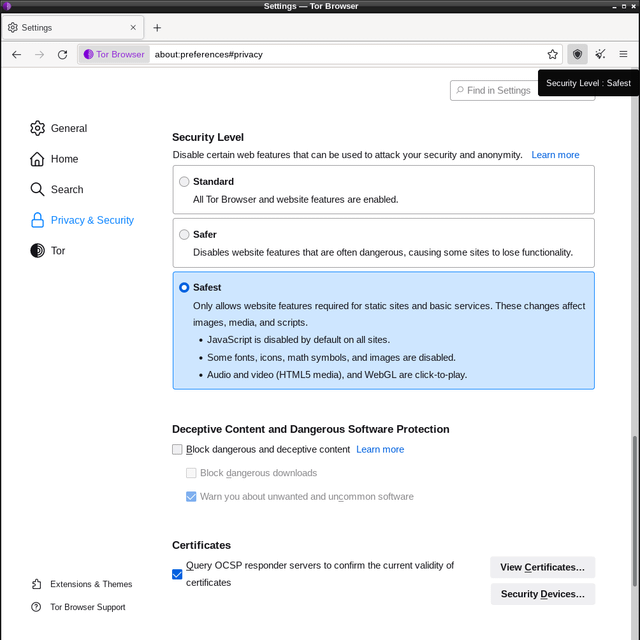
- Security Level. Click the shield icon in the toolbar and choose Change. Safest turns JavaScript off on every site, which shuts the door the Freedom Hosting exploit came through. Most markets and forums are built to work without JavaScript. We run Safest on all of them and drop to Safer only when a site we trust will not work otherwise, then go back.
- Updates. Install them the day they arrive. Each one closes browser flaws of exactly that kind.
- No add-ons and no other tweaks. Every change to fonts, extensions or settings makes your browser rarer among Tor users, and a rare browser is a recognisable one.
- New Identity between identities. The broom icon, or New identity in the menu, closes every tab, clears the session and starts fresh circuits. Use it whenever you switch from one identity to another, and never have two open at once.
- Downloads. Tor Browser warns that some files, PDFs and office documents among them, can connect to the internet outside Tor when opened. Open them offline, or in Tails, where nothing can leave outside Tor.
- Personal accounts stay out. Your email, social media and anything with your name on it never get logged into in the browser you use for a Tor identity.
- Bridges, under Settings and Connection, hide the fact that you use Tor from your ISP or employer. Worth it only if that fact is the risk.
Do you need Tails or Whonix?
- Tor Browser on your everyday system
- Enough when the threat is the network and the sites you visit. The cost is that your computer keeps traces, and that nothing outside the browser, your PGP program or a wallet, is forced through Tor.
- Tails
- Runs from a USB stick, forces every connection through Tor, and forgets everything at shutdown except what you choose to keep in its encrypted Persistent Storage. Kleopatra is built in. Right for a shared computer, or one that could be examined, and for anyone who wants nothing on the hard drive. It costs a reboot each session and some patience. It does not protect against a compromised computer underneath or someone watching the screen, as the Tails warnings page spells out.
- Whonix
- Two virtual machines: one that does nothing but run Tor, and one for your work that can reach the internet only through the first. Malware or a misbehaving program inside the work machine cannot learn your real IP address. Right for heavy daily use of several tools under one identity. It needs a clean host system, and the virtual machines leave traces on the host's disk.
For most readers who need more than Tor Browser, Tails is the answer: it closes the device threat and the outside-Tor leak in one step, and it asks for no maintenance beyond updates.
Keeping separate identities separate
An identity is everything a reader of a seized database could tie together: a username, a password, a key, a writing style, a pattern of hours. Keeping two apart means none of those cross over.
- A full fresh set for each identity: username, password, PGP key and, if one is needed at all, email. Nothing reused from another identity or from your real life. The key in particular, because the same public key on two profiles is proof they are one person; our guide to setting up PGP covers making one per identity.
- One identity per session. New Identity in Tor Browser, or a reboot of Tails, between them. Two identities in one session share a browser state that can tie them together.
- Leave your life out of it. Your city, the weather, your job, a local news story, a holiday you are about to take, the hour on your clock. Each one alone means little; three of them narrow the field to a town.
- Write differently. Writing style can be matched across accounts: spelling such as colour or color, punctuation habits, favourite phrases, emoji. Write shorter and plainer than you normally would, and never paste text from one identity into another.
- Watch your hours. Posting only between seven and eleven in the evening, in one time zone, gives away the time zone.
- Never connect your own identities. No messages between them, no vouching for one with the other, no shared contacts introduced under both names.
- A slip ends the identity. If a real name, a reused handle or a traceable payment touches it, retire it and start clean, carrying nothing across. Patching it leaves the old link sitting in someone's records.
What file metadata gives away
Every file carries data about itself, and that data travels with the file.
- Photos carry EXIF data: the camera or phone model, often its serial number, the date and time, and on most phones the GPS position where the picture was taken.
- Documents carry the author's name, usually taken from the computer's user account, plus the organisation, comments, edit history and sometimes file paths containing your username.
- PDFs record the program that made them and often the author field from the original document.
- Screenshots carry whatever was on screen: the taskbar, the clock, the system language, other tabs, notifications. Cropping does not always help, either. In 2023 flaws in Google Pixel's Markup tool and the Windows Snipping Tool left the cropped-out part of an image recoverable from the saved file.
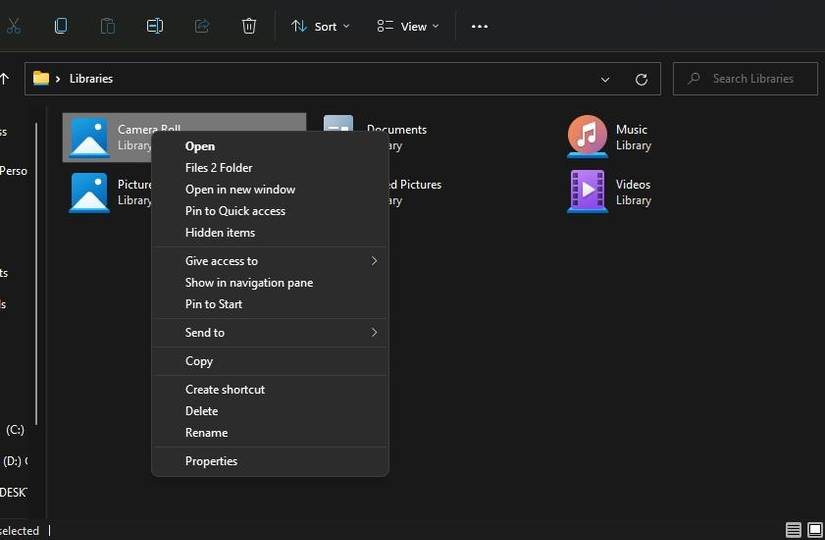
Tails includes mat2, which removes metadata from most image, document and audio formats; right-click a file and choose Remove metadata. It cannot remove what is in the picture itself, such as a reflection, a view from a window or a recognisable room. When text is what matters, retyping it into a fresh plain-text message beats uploading the document it came from.
A checklist sized to the threat
| Habit | What it stops | What it costs | Who needs it |
|---|---|---|---|
| Safest security level | Browser exploits that rely on JavaScript | The odd site breaks | Everyone, on every market and forum |
| A fresh username, password and key per identity | Links between identities, and to your real life | More keys to look after | Everyone |
| Encrypting messages yourself before sending | A market, or the police after a seizure, reading them off the server | A minute per message | Everyone |
| Stripping metadata from every file | Camera, location and author data leaving with the file | One step per file | Anyone who uploads anything |
| Full-disk encryption, machine off when unattended | A seized or stolen device being read | A passphrase at every start | Anyone who keeps keys or files on their own computer |
| Tails | Traces on your computer, and connections outside Tor | A reboot each session | Shared or examinable computers, and the device threat |
| Bridges | Your ISP or employer seeing that you use Tor | A slower connection | Anyone for whom Tor use itself is the risk |
| Whonix | IP leaks from other programs or malware | A clean host and a heavier setup | Heavy daily use of several tools under one identity |
The first five rows are cheap, and skipping any of them is how most people get linked. The last three are worth their cost only if your threat model puts you there. Encrypting your own messages matters on every market, including a walletless one like Mars: our Mars Market overview explains how its design limits what an exit can take, but nothing about a market's design limits what its records say once someone else holds them.
What OPSEC cannot fix
Some things are out of your hands once they have happened. Old posts are archived. A key you published with your email on it sits in copies you cannot recall. The person on the other side of a conversation keeps their own records, on their own device, and their OPSEC is not yours. Malware on your computer sees everything before Tor or PGP touches it, which is why the most careful habits on a compromised machine protect nothing. And none of this changes the legal position of what an identity is used for.
The hardest limit is that a single mistake works backwards. One reused handle links everything ever done under the identity, not just what came after, and a better habit adopted today protects only what comes after today.